

Close Menu
  • Home
  • Daily
  • AI
  • Crypto
  • Bitcoin
  • Stock Market
  • E-game
  • Casino
    • Online Casino bonuses
  • World
  • Affiliate News
  • English
    • Português
    • English
    • Español

Subscribe to Updates

Subscribe to our newsletter and never miss our latest news

Subscribe my Newsletter for New Posts & tips Let's stay updated!

What's Hot

Mouse P.I. for Hire Poster Girl Walkthrough – Posters Location

April 20, 2026

JSCC Tests Japanese Government Bonds as Digital Collateral on Canton

April 20, 2026

Alberta Online Gambling Market Set for July 13 Launch

April 20, 2026
Facebook X (Twitter) Instagram
MetaDaily – Breaking News in Crypto, Markets & Digital Trends
  • Home
  • Daily
  • AI
  • Crypto
  • Bitcoin
  • Stock Market
  • E-game
  • Casino
    • Online Casino bonuses
  • World
  • Affiliate News
  • English
    • Português
    • English
    • Español
MetaDaily – Breaking News in Crypto, Markets & Digital Trends
Home » How to Set Custom Tactics & Player Instructions in EA FC 26
Egame

How to Set Custom Tactics & Player Instructions in EA FC 26

adminBy adminOctober 3, 2025No Comments4 Mins Read
Facebook Twitter Pinterest LinkedIn Tumblr WhatsApp VKontakte Email
Share
Facebook Twitter LinkedIn Pinterest Email
Up to $1500 Welcome Bonus
+50 Freespins
Always 25% Bonus with every Crypto Deposit!
Join Now


While EA Sports FC 26’s AI-controlled players aren’t awful by default, if you’re looking to get the upper hand against your opponent in Ultimate Team’s Rivals or Champions game modes, you’ll most likely want to implement some custom tactics and player instructions. These essentially give you a greater level of control over your player’s behaviors on the pitch, as well as how your team will typically play when both on and off the ball. In this guide, I’ll run you through how to set custom tactics and player instructions in EA FC 26.

How to Set Custom Tactics in EA FC 26

Determine How Your Team Builds Up and Defends
set custom tactics in ea fc 26

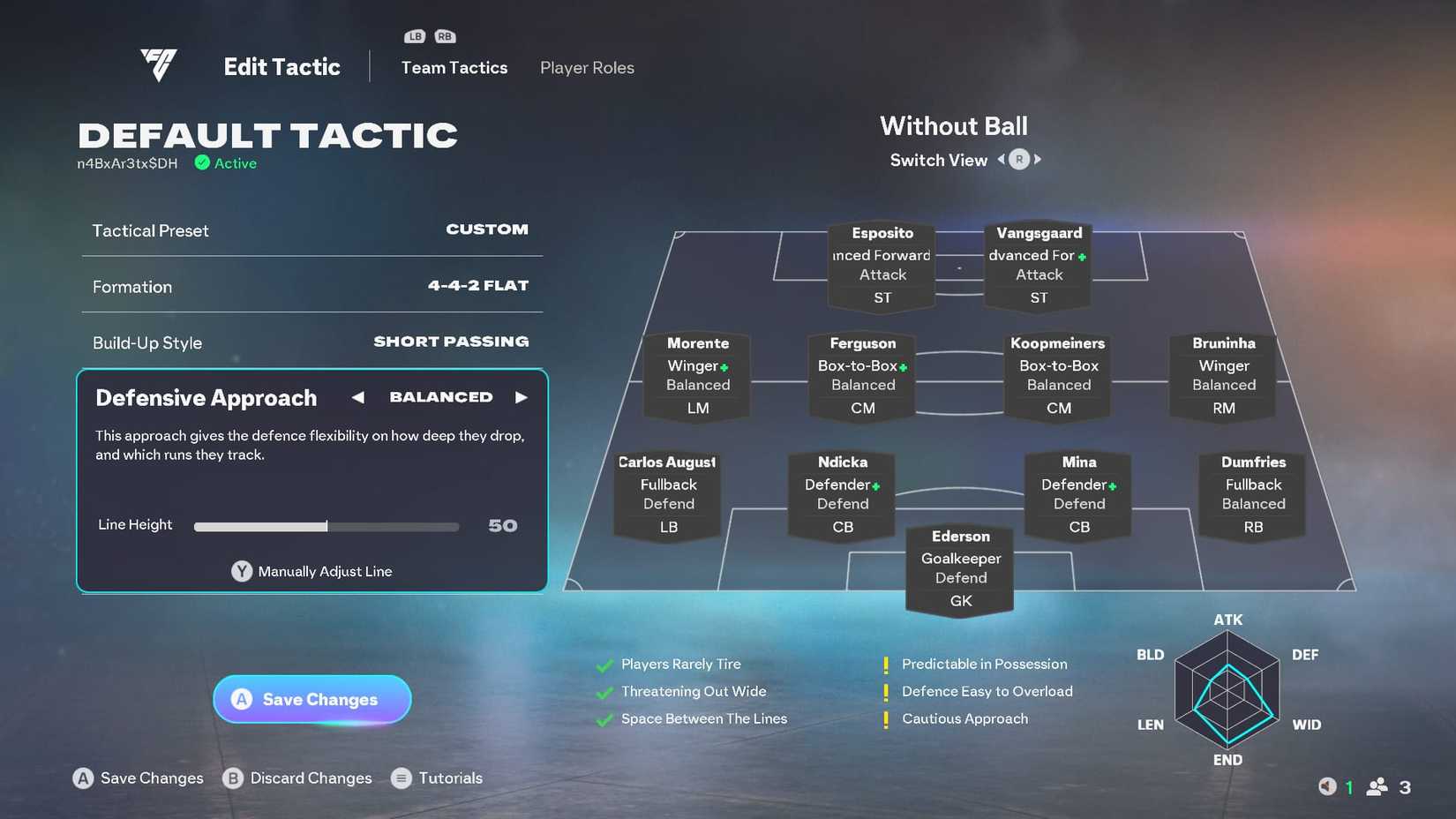
As mentioned above, setting custom tactics isn’t just about choosing the formation. It’s also about how your team plans to build up when they’ve got the ball, and how they will attempt to defend when they’re without it.

To access custom tactics in Ultimate Team, go to your Squad page and press L3 to access the ‘Team Management’ menu on the left side of the screen and then go to ‘Tactics.’

This is also the same menu where you can change your Ultimate Team’s Squad name. In other game modes, you need to access the ‘Tactics’ screen to reach the Custom Tactics and Players Instructions screens from the mode’s main menu.

From here, you’ll then be given the ability to adjust your team’s formation, build-up style, and defensive style. The build-up style should be based on how you typically like to play. If you enjoy short passing, then select short passing. If you like to try and catch your opponent off guard, then the counterattack option is the one you’ll want.

Defensive approach determines things like how deep your defensive players will drop, and which runs they track. A balanced approach is typically the default, but if you feel your team has the work rate, strength, and stamina for it, opting for the ‘Press After Possession Loss’ approach means your players will relentlessly chase down the ball until they’ve regained possession. This does mean that they’re likely to be pulled out of position, though, so be prepared for the ball over the top.

Ultimately, the formation, build-up style, and defensive approach you choose will depend on your players and your preferred playing style.

How to Change Player Instructions in EA FC 26

Get Granular With Your Players
change player instructions in ea fc 26

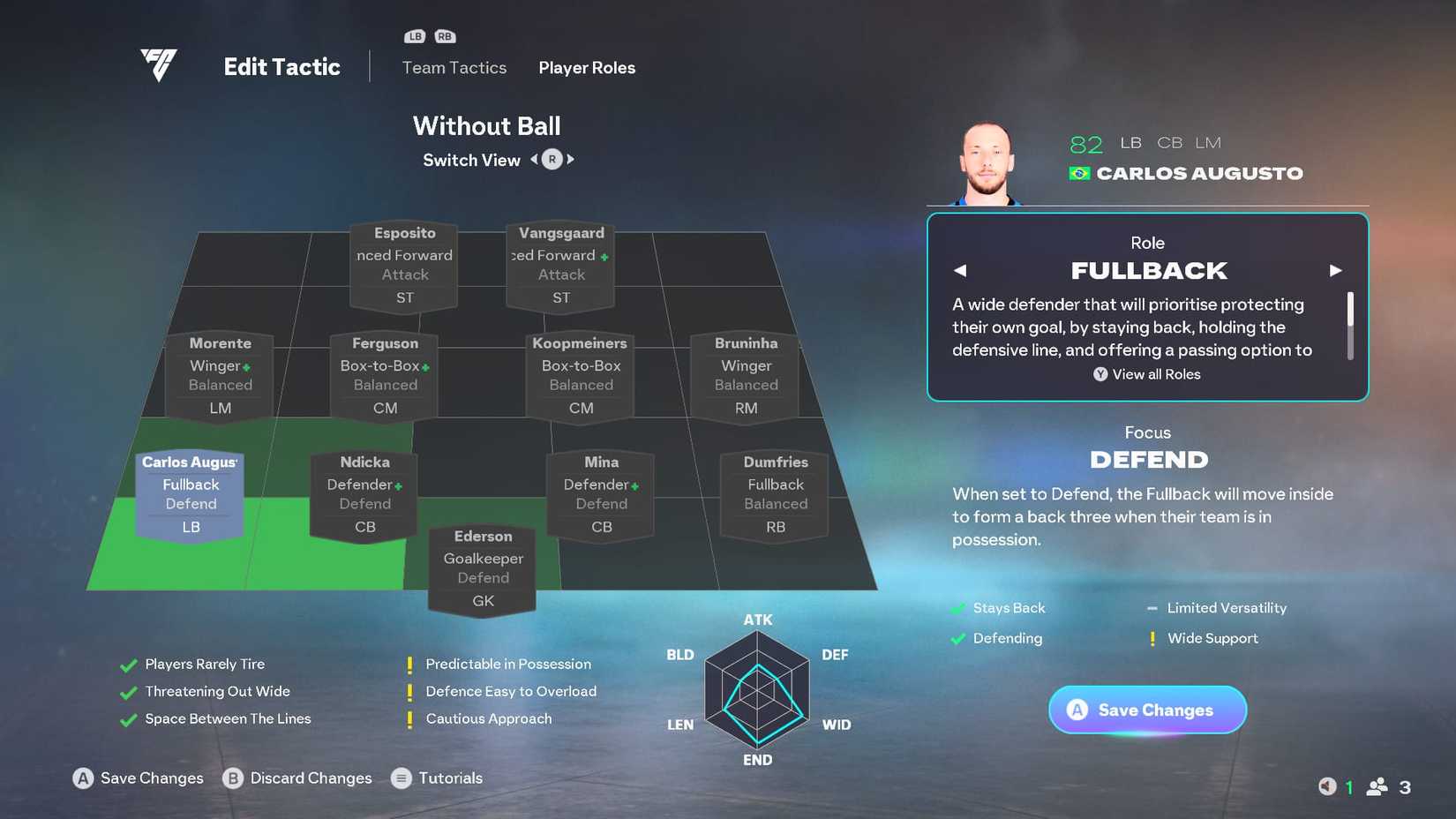
If giving general team instructions isn’t enough, player instructions let you really dig into how each player is going to operate in your team. This, combined with setting custom tactics, is the best way to really get your team ticking. To do this, when you’re in the ‘Tactics’ menu, press RB on Xbox or R1 on PlayStation to tab over to the Player Instructions screen.

From here, select the player that you want to assign instructions to. You can now change their role and focus both with and without the ball (use the right stick to toggle between the two). You can see how your instructions adjust how your team’s set up to play below your lineup, with ticks showing what benefits the setup brings, and yellow exclamation points outlining weaknesses. The diagram to the right of them also shows the strengths and weaknesses of the overall approach in a more visual form.

Using player instructions is a great way to play to a player’s strengths. For example, if you have a fast striker, you might want to use the ‘Get in Behind’ to exploit slower defenses and create more chances.

es sports fc 26 tag page cover art

Released

September 26, 2025

ESRB

E For Everyone

Engine

Frostbite


Source link

Up to $1500 Welcome Bonus
+50 Freespins
Always 25% Bonus with every Crypto Deposit!
Join Now
Share. Facebook Twitter Pinterest LinkedIn Tumblr WhatsApp Email
Previous ArticleBNB Price Surges Past $1,100 Amid Ecosystem Growth and Token Burns
Next Article Metaplanet | 4th Largest Public Bitcoin Holder
admin
  • Website

Related Posts

Mouse P.I. for Hire Poster Girl Walkthrough – Posters Location

April 20, 2026

Steam Users Have Until May 1 to Get $173 Worth of Games for Just $13

April 20, 2026

This “Addictive” Period Drama Show is a Must Watch (& It Has Another Season Coming Soon)

April 20, 2026

Arceus, Z-A, Scarlet and Violet Almost Mandatory

April 19, 2026

Comments are closed.

Our Picks

Voluptatem aliquam adipisci dolor eaque

April 24, 2025

Funeral of Pope Francis Coincides with King’s Day Celebrations in the Netherlands and Curaçao

April 24, 2025

Curaçao’s Waste-to-Energy Plant Remains Unfeasible Due to High Costs

April 23, 2025

Dutch Ministers: No Immediate Threat from Venezuela to ABC Islands

April 23, 2025
Don't Miss
Affiliate Network News

Awin Wins Big at Global Performance Awards 2025

By adminOctober 22, 20250

Awin and our partners made this year’s Global Performance Marketing Awards one to remember, claiming…

Awin Shortlisted 11 Times at GPMA 2025

September 11, 2025

Awin’s CPI Recovers $100M in Affiliate Revenue

September 11, 2025

Awin and Birl partner to transform resale into a scalable growth engine for brands

August 28, 2025
About Us
About Us

Welcome to MetaDaily.io — Your Daily Pulse on the Digital Frontier.

At MetaDaily.io, we bring you the latest, most relevant, and most exciting news from the world of affiliate networks, cryptocurrency, Bitcoin, egaming, and global markets. Whether you’re an investor, gamer, tech enthusiast, or digital entrepreneur, we provide the insights you need to stay ahead of the curve in this fast-moving digital era.

Our Picks

Alberta Online Gambling Market Set for July 13 Launch

April 20, 2026

Platipus Gaming Secures Ontario Supplier Licence

April 17, 2026

How It Works, Legal Battles, and Rapid Growth Explained

April 16, 2026

Subscribe to Updates

Subscribe to our newsletter and never miss our latest news

Subscribe my Newsletter for New Posts & tips Let's stay updated!

Facebook X (Twitter) Instagram Pinterest
  • Home
  • About Us
  • Advertise With Us
  • Contact Us
  • Privacy Policy
  • Terms & Conditions
  • DMCA
© 2026 metadaily. Designed by metadaily.

Type above and press Enter to search. Press Esc to cancel.