'/%3E%3C/svg%3E)

'/%3E%3Cpath%20fill='%23b2b2b2'%20d='M241%20382q0%2016%2017%2026%2017%2011%2042%2011t42-11q16-11%2017-26V269H241'/%3E%3Cpath%20fill='%239f7e00'%20d='M241%20379q0%2014%208%2023%209%209%2021%209%2014%200%2021-9%209-9%209-23V269h-59'/%3E%3Cpath%20d='M241%20339v-70h59v110q0%2014-9%2023l-6%205v-68h-15v72q-8%200-14-4v-68zm59%2040c0%2022%2015%2032%2029%2032%2021%200%2030-18%2030-32v-40h-59'/%3E%3Cpath%20fill='%239f7e00'%20d='M266%20277v5h2v12h-3v-5h2v-5h-9v5h2v5h-4v9h3v18h-5v10h34v-10h-5v-18h3v-9h-4v-5h2v-5h-9v5h2v5h-3v-12h2v-5zm42%20101q0%2010%206%2017%206%206%2015%207%2010-1%2016-7%206-7%206-17v-29h-43'/%3E%3Ccircle%20fill='%230044ad'%20cx='329.5'%20cy='372'%20r='6'/%3E%3Cellipse%20fill='%230044ad'%20cx='300'%20cy='340'%20rx='16'%20ry='21'/%3E%3C/svg%3E)





As your Miis interact with each other more and more, they’ll soon become friends in Tomodachi Life: Living the Dream. At this stage, you’ll be able to have each Mii give the other one a nickname. This can be an abbreviation of their name, something they’re called in real life, or just something funny like an inside joke. After you’ve seen the nickname used in conversation, you might find that it doesn’t work quite as well or want to change the pronunciation. Here’s how to change Mii nicknames in Tomodachi Life: Living the Dream.

Related
Tomodachi Life: Living the Dream – Romance Guide
From friendships to lasting partnerships, players can master the romance mechanics in Tomodachi Life: Living the Dream using this guide.
Quick Steps to Changing a Mii’s Nickname in Tomodachi Life Living the Dream
Select the Mii who uses the nickname you want to change and open up the side menu
Go to ‘Terms’ (the second icon down that looks like a mouth) and select nicknames
Select the Mii whose nickname you want to change
Change the nickname to whatever you want
Press + to confirm your decision
How to Change Mii Nicknames in Tomodachi Life Living the Dream
Select the Mii who is using the nickname for another Mii that you want to change. Press Y to open up the right sidebar menu and select the Terms option before selecting Nicknames.
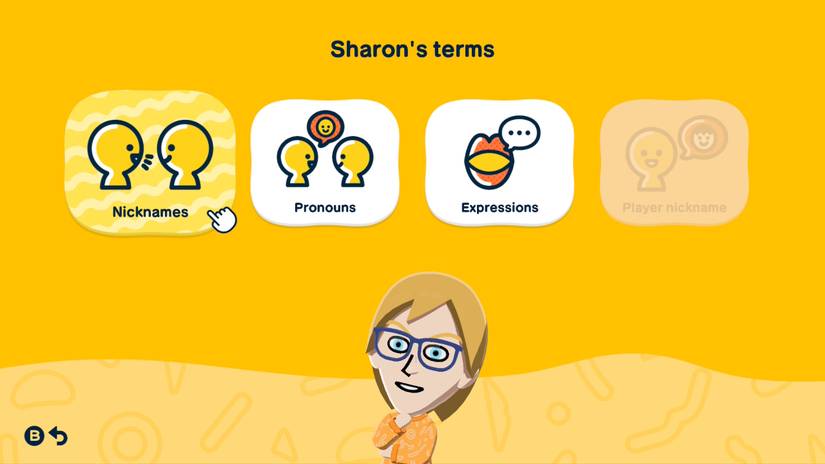
You’ll now be able to choose which of that Mii’s friends you want to change the nickname of. Select them and press A
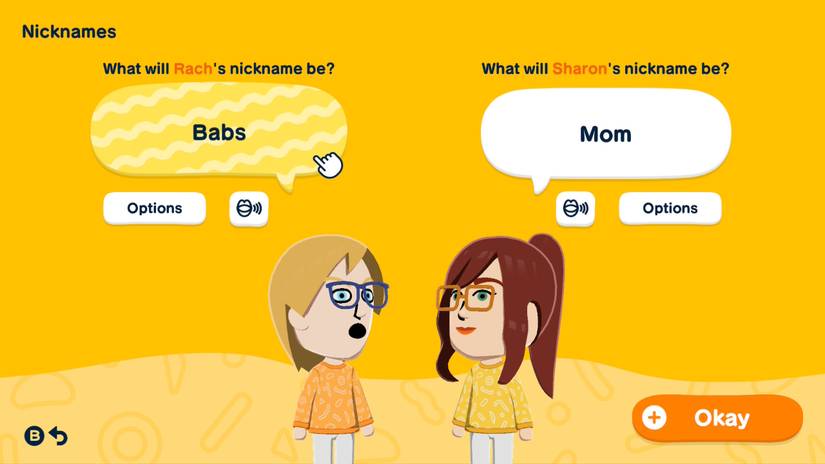
This will bring you to the Nicknames screen. All you need to do is select the nickname in the speech bubble that you want to change here and type in the nickname you want to replace it with. In the example I’ve used in the screenshots here, I’ve changed the nickname that Sharon uses for Rach to ‘babs.’
Below the speech bubble is a little button with an open mouth on it. Selecting this allows you to change the pronunciation of the word. This can be useful for names that are spelt different to how they are phonetically pronounced. When using this option, you want to spell the name the way it sounds, rather than its correct written spelling. For example, ‘Soph’ (short for Sophie) would be spelled ‘Sofe’ to get the softer ‘oh’ sound in the middle.
On this nicknames screen, you’ll also have an ‘Options’ button. Select this, and you can change the nickname that the Mii uses when talking to others about the other Mii. For example, if you want a child to call their sibling “bro” but their given name when talking about them to other Miis, you can use this option to select their name (or use something else entirely).
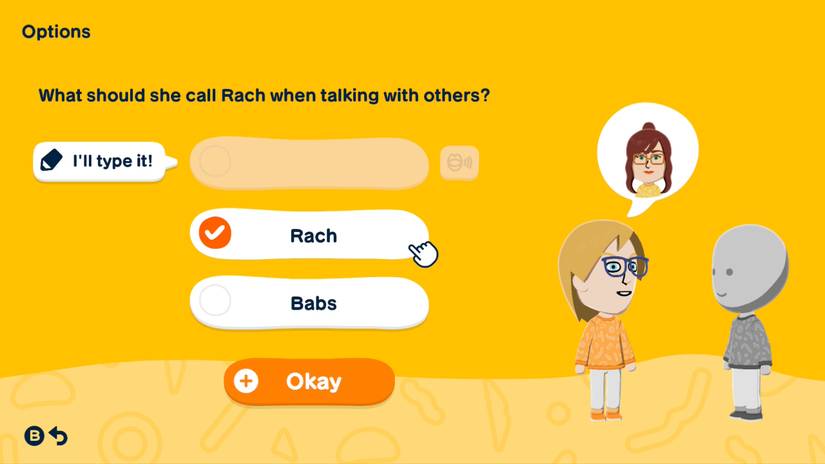
Again, in the example I’ve used here, I’ve made it so that Sharon refers to her daughter by her actual name, rather than her endearing nickname that she wouldn’t use in conversations with others. During my hours playing the game, there’s no maximum number of times that you can change a Mii’s nickname, so feel free to change it as often as you’d like.
Keep in mind that this is different from the way you change the name that Miis will call you, the player. If you’re looking to edit or remove a Mii entirely, we’ve got a guide for that, too.

Released
April 16, 2026
ESRB
Everyone / Comic Mischief, Mild Fantasy Violence
Developer(s)
Nintendo
Publisher(s)
Nintendo

